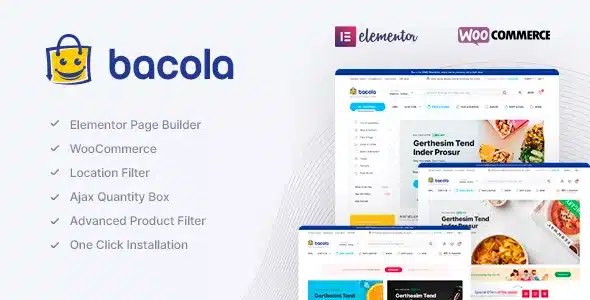
Bacola Grocery Store and Food Theme v1.5.7 GPL – eCommerce Optimized Design – Bacola is a premium WordPress theme meticulously designed for online grocery stores, food delivery services, and organic food shops. It offers a comprehensive suite of features to create a powerful and engaging e-commerce experience.
Contents
Bacola Grocery Store and Food Theme Features
- Intuitive Drag & Drop Page Building: Bacola integrates seamlessly with Elementor, allowing you to create and customize stunning pages with a user-friendly drag-and-drop interface. No coding knowledge is required, giving you full creative control over your store’s design and layout.
- Revolution Slider Included: Showcase your promotions, new arrivals, and special offers with the powerful Revolution Slider plugin, bundled free with Bacola. Create dynamic and engaging slideshows to capture your customers’ attention immediately.
- Advanced Theme Options Panel: Personalize every aspect of your website with Bacola’s robust theme options panel. Easily manage colors, fonts, layouts, headers, footers, and much more, ensuring your brand identity shines through without needing custom CSS.
- Seamless WooCommerce Integration: Bacola is built from the ground up for WooCommerce, providing a stable and highly functional e-commerce platform. Enjoy all the benefits of WooCommerce for managing products, orders, shipping, and payments with enhanced Bacola-specific features.
- One-Click Demo Import: Get your online store up and running quickly with the one-click demo import feature. Choose from professionally designed demos and import content, layouts, and settings to kickstart your website development effortlessly.
- Responsive and Retina Ready Design: Your grocery store will look impeccable on any device, from desktops to smartphones and tablets. Bacola is fully responsive and retina-ready, ensuring a crisp and optimal viewing experience for all your customers.
- Multiple Product Page Layouts: Present your products in the best light with a variety of customizable product page layouts. Choose the layout that best suits your product types and encourages conversions, offering a flexible display for your inventory.
- Quick View Product Option: Enhance the shopping experience by allowing customers to quickly view product details in a popup without leaving the current category page. This streamlines browsing and encourages quicker purchasing decisions.
- Ajax Add to Cart Functionality: Improve user experience with seamless Ajax Add to Cart. Products are added to the cart without a full page reload, providing a smoother and faster shopping journey for your customers.
- Product Wishlist Feature: Enable customers to save their favorite items for later with a built-in wishlist functionality. This encourages repeat visits and helps users keep track of desired products, potentially leading to future purchases.
- Compare Products Feature: Allow your customers to compare different products side-by-side based on their features and specifications. This helps shoppers make informed decisions and find the ideal items for their needs.
- Advanced Search and Filtering: Provide a superior shopping experience with powerful search and filtering options. Customers can easily find specific products based on categories, attributes, price ranges, and more, making navigation effortless.
- Customizable Header and Footer Styles: Choose from a range of pre-designed header and footer styles, or customize them to match your brand. Bacola offers extensive options to create unique and functional navigation areas for your website.
- Mega Menu Support: Organize large numbers of categories and subcategories with ease using the integrated Mega Menu. This ensures a clean and intuitive navigation structure, improving usability for stores with extensive product catalogs.
- Translation Ready and RTL Support: Bacola is fully translation ready, allowing you to reach a global audience. It also supports Right-to-Left (RTL) languages, making it suitable for a wider range of markets.
- SEO Optimized Code: Built with search engine optimization best practices in mind, Bacola helps your store rank higher in search results. The theme’s clean code structure contributes to better visibility and organic traffic.
- Cross-Browser Compatibility: Ensure a consistent experience for all your users, regardless of their preferred browser. Bacola performs flawlessly across major web browsers like Chrome, Firefox, Safari, and Edge.
- Dedicated Support and Documentation: Access comprehensive online documentation and dedicated customer support to assist you with any questions or issues. Get the help you need to maximize your Bacola theme experience.
- Testimonials and Customer Reviews: Showcase customer feedback and testimonials to build trust and credibility for your grocery store. Bacola includes dedicated sections for displaying reviews, influencing informed purchasing decisions.
- Blog Post Layouts: Engage with your audience and improve SEO by sharing valuable content through a dedicated blog. Bacola offers multiple blog layouts to present articles, recipes, and news effectively.
- Social Media Integration: Connect your online store with your social media presence. Bacola makes it easy to link to your social profiles, expanding your reach and engagement with your customer base.
- Contact Form 7 Compatibility: Integrate popular contact forms easily with Contact Form 7 support. Allow customers to get in touch with you efficiently for inquiries, support, or feedback.
- Child Theme Included: Safely customize your theme without worrying about losing changes during updates. A child theme is included, providing a secure way to make modifications and future-proof your design.
- Lifetime Free Updates: Benefit from ongoing improvements, new features, and compatibility updates with lifetime free updates. Keep your Bacola theme current and aligned with the latest WordPress and WooCommerce standards.
Download Bacola Grocery Store and Food Theme GPL
VirusTotal
to ensure it’s safe.
How to Install WordPress Plugins or Themes
- Download the plugin or theme .zip file from a trusted source.
- Log in to your WordPress dashboard.
- For Plugins: Go to Plugins → Add New → Upload Plugin, then upload the .zip file.
- For Themes: Go to Appearance → Themes → Add New → Upload Theme, then upload the .zip file.
- Click Install and then Activate once the upload completes.
- Configure settings as needed and start using your plugin or theme.
⚠️ Important: Always scan any downloaded files using
VirusTotal or another security tool before installing.
is not affiliated with or endorsed by the original developers of this software.
All files are distributed under the GNU General Public License (GPLv2 or later). Always verify safety before installation.