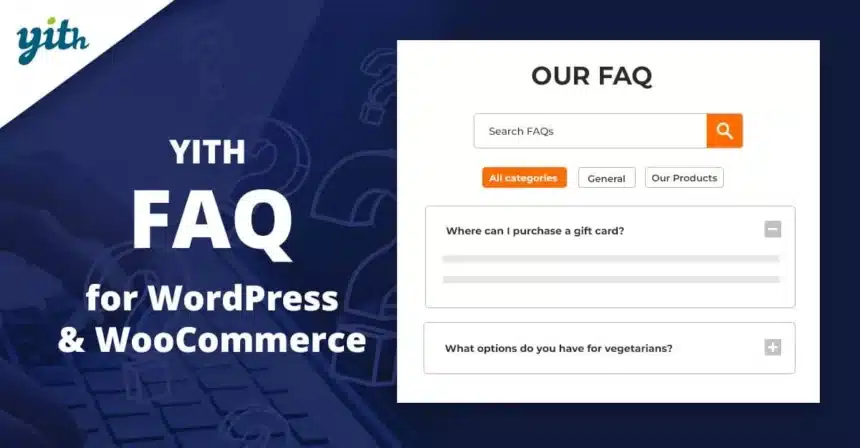
YITH FAQ Premium v2.39.0 GPL – Boost Customer Satisfaction with FAQs – The ultimate WordPress and WooCommerce plugin to create a comprehensive and user-friendly FAQ section, enhancing customer support and reducing common queries with ease.
Contents
YITH FAQ Premium Plugin Features
- Intuitive FAQ Management: Easily create, edit, and organize an unlimited number of questions and answers directly from your WordPress dashboard, ensuring a streamlined process for content creators. This feature allows for quick updates to keep your FAQ section always relevant and helpful.
- Category-Based Organization: Group FAQs into logical categories to improve navigability and user experience. Customers can quickly find answers by browsing through sections like “Shipping,” “Returns,” or “Account Management,” significantly reducing support requests.
- Search Functionality: Implement a powerful search bar within your FAQ section, enabling users to find specific answers instantly. This proactive feature empowers customers to self-serve, saving time for both them and your support team.
- Accordion Display Layout: Present FAQs in a clean and compact accordion style, allowing users to click on a question to reveal its answer. This modern design keeps your FAQ page tidy and prevents overwhelming visitors with too much information at once.
- Shortcode Integration: Display your FAQ sections anywhere on your WordPress site using simple shortcodes. This flexibility allows you to embed FAQs on product pages, contact pages, or dedicated FAQ pages, ensuring answers are always accessible.
- Customizable Styling Options: Tailor the appearance of your FAQ section to match your brand’s aesthetic. Adjust colors, fonts, icons, and layouts to ensure a consistent and professional look across your entire website without needing custom CSS.
- WooCommerce Product FAQ Integration: Add specific FAQ sections to individual WooCommerce product pages. This is incredibly useful for addressing common questions about specific items, clarifying details, and helping customers make informed purchasing decisions.
- User Question Submission Form: Allow customers to submit questions directly through a dedicated form within the FAQ section. This provides valuable insights into common pain points and helps you identify gaps in your existing FAQ content.
- Email Notification for New Questions: Receive email alerts whenever a new question is submitted by a user. This ensures that you can respond promptly and keep your FAQ content updated with new insights from your audience.
- Upvote/Downvote System for Answers: Implement a feedback mechanism where users can rate the helpfulness of each FAQ answer. This data helps you optimize your FAQ content, improving clarity and effectiveness over time.
- Drag-and-Drop Reordering: Easily reorder FAQs and categories using a simple drag-and-drop interface. This intuitive management tool allows for flexible arrangement of your content based on priority or popularity.
- Multilingual Support (WPML Compatible): Ensure your FAQ section is accessible to a global audience with full compatibility with WPML and other popular translation plugins. Provide answers in multiple languages to cater to diverse customer bases.
- SEO Optimization for FAQs: Structure your FAQ content in a search engine-friendly manner, helping your answers rank higher in search results. This increases organic traffic to your valuable FAQ resources and improves overall site visibility.
- Import/Export Functionality: Easily import and export your FAQ data, making it simple to migrate content between sites or create backups. This feature streamlines site management and content portability.
- Display Options Control: Choose how and where your FAQs are displayed, including options to show or hide categories, search bars, and submission forms. This granular control allows for a fully customized user experience.
- Specific WordPress Block Integration: Utilize dedicated WordPress blocks for displaying FAQs, making it easy to add and manage your content within the Block Editor (Gutenberg). This provides a native and intuitive content creation experience.
- Detailed Documentation and Support: Access comprehensive documentation and dedicated support to help you configure and troubleshoot the plugin effectively. This ensures you can maximize the potential of your FAQ section with expert assistance.
- Frequently Asked Questions Page Template: Leverage a dedicated page template for displaying your main FAQ section, offering a professional and well-structured layout right out of the box. This helps in quickly setting up an effective FAQ presence.
- Highly Responsive Design: Ensure your FAQ section looks and functions perfectly across all devices, from desktops to mobile phones. This responsive design guarantees a positive user experience for every visitor, regardless of their screen size.
- Automated Search Intent Matching: The plugin intelligently helps users find answers by suggesting relevant FAQs as they type in the search bar, anticipating their needs and guiding them to the correct information more quickly. This predictive search enhances user satisfaction.
- Integrated Analytics (Coming Soon/Advanced Versions): Gain insights into which FAQs are most viewed, what terms users are searching for, and which questions are submitted most often, allowing for continuous improvement of your content strategy.
Download YITH FAQ for WordPress & WooCommerce Premium GPL
VirusTotal
to ensure it’s safe.
How to Install WordPress Plugins or Themes
- Download the plugin or theme .zip file from a trusted source.
- Log in to your WordPress dashboard.
- For Plugins: Go to Plugins → Add New → Upload Plugin, then upload the .zip file.
- For Themes: Go to Appearance → Themes → Add New → Upload Theme, then upload the .zip file.
- Click Install and then Activate once the upload completes.
- Configure settings as needed and start using your plugin or theme.
⚠️ Important: Always scan any downloaded files using
VirusTotal or another security tool before installing.
is not affiliated with or endorsed by the original developers of this software.
All files are distributed under the GNU General Public License (GPLv2 or later). Always verify safety before installation.